v1.0.0Beta 6
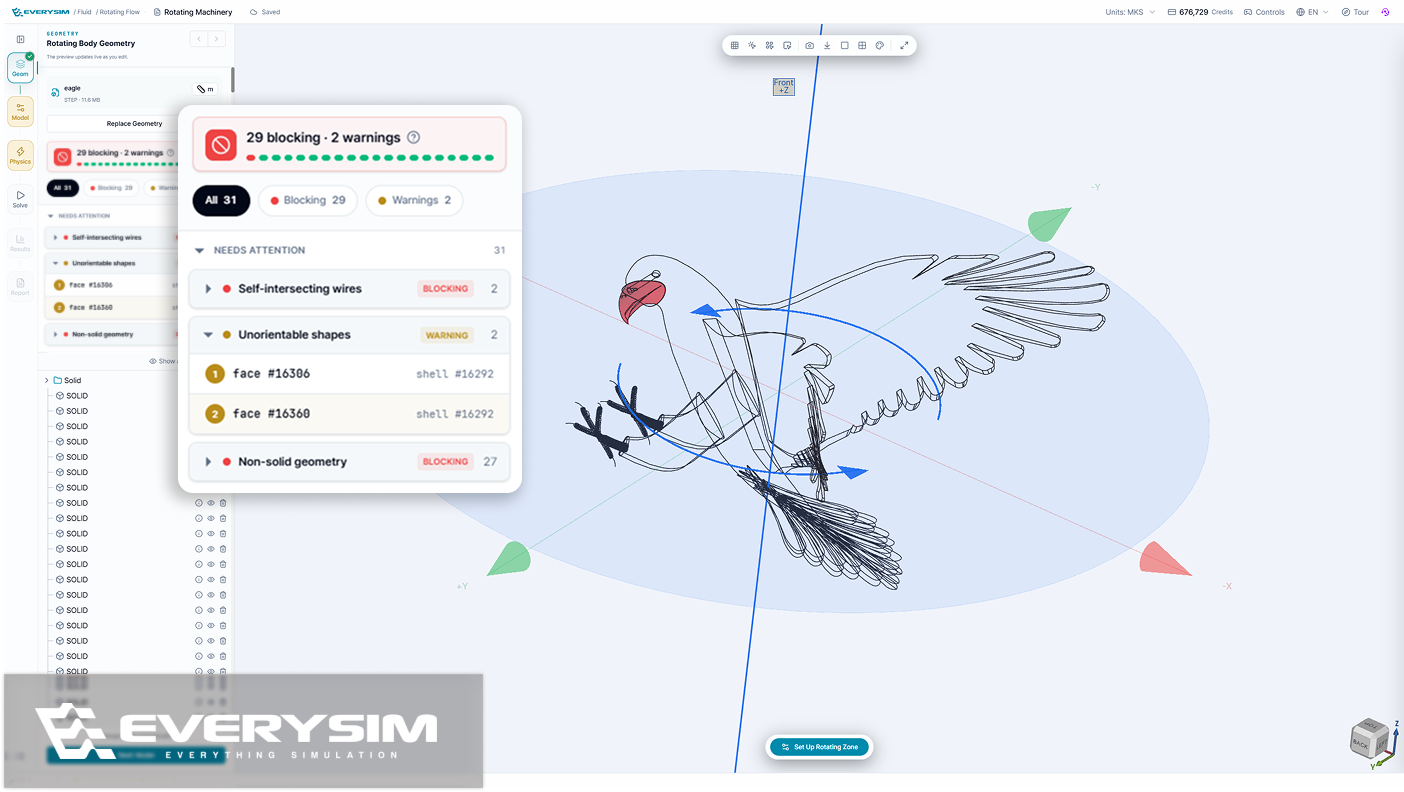
Imported models are now checked before meshing, with everything that needs attention listed part by part and pointed out on the model. Modal Analysis adds a free-free option, and a rotating flow simulation can include a stationary body beside the spinning one.
Added
- A geometry check for imported models, run before meshing and listing every part that needs attention, separating the defects that would stop a simulation from the ones only worth a look, highlighting each one on the model and repairing most in a single step.
- Free-Free in Modal Analysis, for the natural frequencies of a part that is not held in place, with the number of modes and the frequency range set in the same panel and rigid body modes reported alongside the rest.
- A stationary body in Rotating Flow simulations, so a spinning propeller and a fixed part beside it are solved together — the body is positioned directly in the 3D view, with a warning if it overlaps the rotating zone or reaches past the fluid domain.
Improved
- Clearer names and descriptions for Vortex results — body surface, blade lattice, wake, and vortex particles are each named for what appears on screen, and every result explains what changes in the view when you select it.
- Answers in the support chat itself, where the assistant handles common questions on the spot and hands anything left over to a person with the conversation so far attached, so nothing has to be explained twice.
- Tidier boundary condition markers in the view, with one color per type matching the panel, good contrast on light and dark backgrounds, and markers that follow along as direction and magnitude are entered.
Performance
- Mesh quality analysis opens right away, with no waiting.