v1.0.0Beta 9
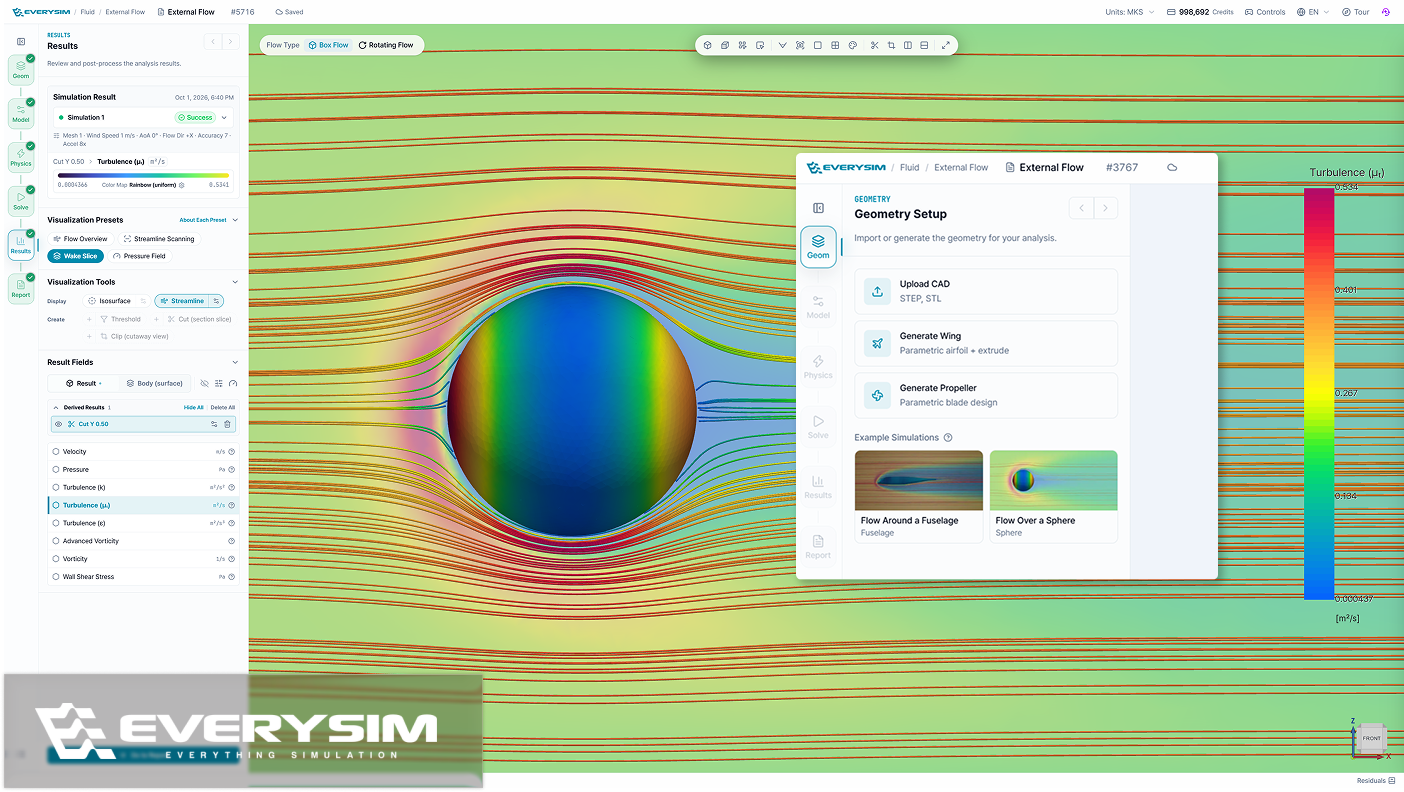
Every analysis type now comes with example simulations. Pick one at the Geometry step, and EverySim loads the model, applies the setup and takes you to the Solve step, so you can run a full case end to end before preparing your own model.
Added
- Example simulations for external flow, rotating flow, Vortex, static structural, modal and transient structural analysis, with geometry and setup predefined.
- Recommended actions for failed runs. Each failure is classified by cause, with buttons to jump to the step that needs fixing, raise Accuracy, or rerun.
- Mesh and run cards now summarize the settings they were generated with.
Improved
- Redesigned static and transient structural reports. They lead with max displacement, von Mises and Tresca stress, and factor of safety, followed by result images and charts. Transient reports show each result at the time step where it peaks.
- Reorganized mesh quality report, so you can check the quality of the mesh used in your simulation at a glance.
- Earlier divergence detection in CFD simulations. Diverging runs are caught and stopped earlier.
- Faster mode shape image generation in modal reports.
- Clearer, more consistent terminology across the app.
Fixed
- Color and opacity set from the right-click menu now apply only to the selection. Coloring a face affects only that face, and making a part transparent no longer affects other parts.